



Table of Contents
-
Where IT Process Automation Tools Reduce Daily Operational Friction
-
How IT Process Automation Software Supports Better IT Governance
-
Business Gains From IT Operations Automation Across Support Teams
-
Practical Steps To Implement IT Process Automation In Stages
-
Choosing IT Process Automation Tools And Next Steps With IT Force
IT process automation turns missed approvals, delayed tickets, manual account changes, and invoice routing into documented workflows. It also helps teams respond to workstation alerts and after-hours support gaps without adding unnecessary manual work. That focus is growing, as 86% of executives say that by 2027, AI agents will make process automation and workflow reinvention more effective.
Jason Stitt, Co-Founder at IT Force, notes: "Automation works best when every workflow has a clear owner, a documented approval path, and a ticket record that shows what changed and why."
Where IT Process Automation Tools Reduce Daily Operational Friction
The early business case starts with repetitive IT work that affects real deadlines. More than 80% cite automating global business services as a major strategic imperative, which reflects the value of cleaner handoffs and fewer missed steps. Automation still needs accountable people behind it, especially when tickets involve access, security, production systems, or customer-facing services.
Key examples of this include:
-
Faster employee onboarding: Account creation, Active Directory groups, Microsoft 365 licensing, and device readiness follow one checklist before day one.
-
Cleaner ticket routing: Requests move to the right queue by category, urgency, location, or affected system to reduce reassignments.
-
More consistent approvals: Access, purchasing, software installs, and role changes follow documented steps with a clear record of approval.
-
Earlier issue detection: Workstation, server, Exchange support, and network alerts escalate before users lose productive time.
How IT Process Automation Software Supports Better IT Governance
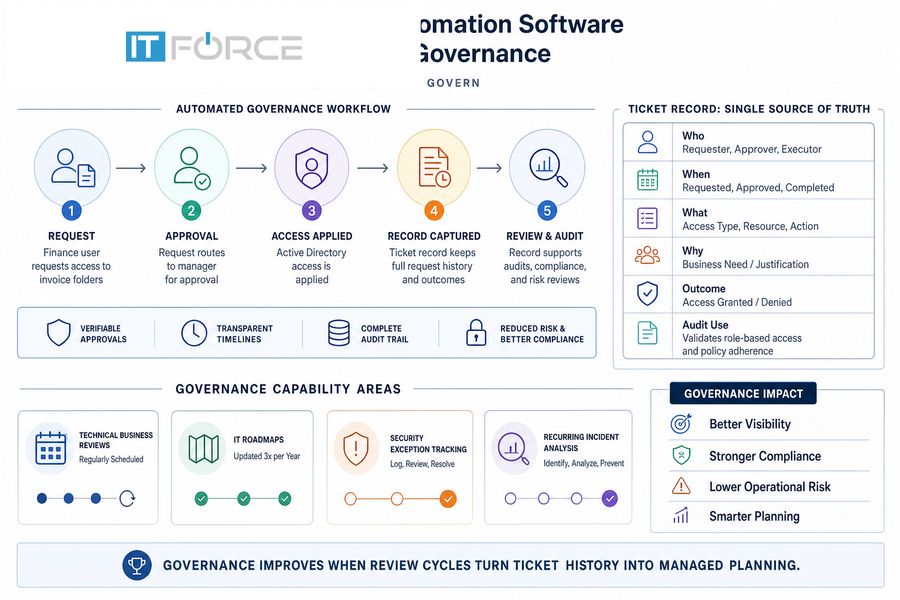
Automation supports governance because it records who approved work, when teams completed it, and whether a recurring issue needs a process change. That matters for audits, customer commitments, compliance needs, and operational risk. IT teams also carry a major share of ownership, since 40% of businesses' automation initiatives are handled by the IT department. At the same time, 89% of respondents now manage multiple automation platforms. Investments continue to grow across cloud automation, WLA/SOAP, infrastructure automation, and DevOps automation.
A finance user requests access to invoice folders. The approval routes to a manager, Active Directory access is applied, and the ticket record keeps the request history. During IT Audits & Assessments, that record helps confirm whether access matched the user's role and whether the approval path was followed.
Business Gains From IT Operations Automation Across Support Teams
IT operations automation connects support, infrastructure, and management decisions through shared workflows. The point is measurable service improvement, not automation for its own sake. 74% of businesses using workflow automation report improved operational efficiency.
Examples of this idea are:
-
Shorter ticket resolution cycles: Routing, categorization, escalation, and user updates reduce time spent chasing status across email and chat.
-
Lower manual administration load: Account changes, software access, password workflows, and repeat requests follow standard service paths so technicians can focus on higher-risk work.
-
Better infrastructure visibility: Server monitoring, workstation health, network alerts, and 24/7/365 support coverage help after-hours issues reach the right queue.
-
More disciplined cloud usage: AI-driven cloud optimization reviews waste, licensing, and usage patterns before spending becomes harder to explain.
-
Stronger department alignment: Manufacturing IT and Marketing IT Services need workflows shaped around production needs, campaign tools, customer data, and platform deadlines.
More Articles You Might Like
Practical Steps To Implement IT Process Automation In Stages
Change is difficult because processes cross people, systems, approvals, and budgets. The appetite is clear, as 64% of U.S. IT leaders want AI-driven workflows and automation, yet only 17% feel prepared to implement them. A staged plan lowers risk before workflows affect critical systems.
Examples of this idea are:
-
Map repeatable requests first: Onboarding, access changes, password workflows, and common software requests usually have clear steps and known approvers.
-
Define approval ownership: Clarify who approves access, purchases, security exceptions, and invoice-related system changes.
-
Review tickets for patterns: Repeated workstation alerts, licensing changes, or access requests often reveal a process gap.
-
Update the roadmap regularly: Connect priorities to quarterly strategy updates, technical business reviews, specialized industry needs, and the IT roadmap.
Reduce IT Delays With Smarter Workflows
Turn manual tickets, approvals, and alerts into documented processes. See how IT Force can help streamline your IT operations.
Choosing IT Process Automation Tools And Next Steps With IT Force
Planning, automation, monitoring, and audits work best when structured communication connects support coverage to standardized ticketing. IT Force helps clients review workflows across Microsoft 365, Active Directory, servers, and workstations. Its personalized support model also covers networks, cloud optimization, manufacturing IT, and marketing IT. Contact IT Force for a practical discussion about scheduled technical business reviews, Controlled Goods Certification needs, industry-specific support, or recurring workstation alerts.