



Leaders ask why managed services matter now because IT issues have moved directly into daily operations: ticket backlogs delay employees, Microsoft 365 exposure threatens customer data, aging workstations interrupt production, and cloud spend grows without clear ownership.
As managed services now represent approximately 25-30% of the overall IT services market, this is no longer a niche support model. It is an operating decision tied to uptime, approvals, invoices, customers, and risk visibility.
We see the question most often when internal teams are stretched and leaders need a structured path for support, security, and planning. If no one owns the ticket, patch, backup test, permission request, or roadmap decision, the business absorbs the delay.
Jason Stitt, Co-Founder at IT Force, notes: "Managed IT works when leaders can see who owns the issue, what changed, and how the fix protects the next shift, invoice, or customer commitment."
Plan IT Support Costs Around Business Risk
Reduce surprise IT costs, improve response coverage, and align support with business continuity, security, and growth.
Why Managed Services Belong In Operational Planning
The importance of managed services shows up when IT affects revenue work. Ticket ownership, monitoring, budget control, and security hygiene determine whether employees can process orders, approve invoices, respond to customers, and keep production moving.
-
Predictable issue ownership: Our standardized ticketing and response workflow gives leaders a clear path for intake, triage, updates, and accountability.
-
Less avoidable downtime: Proactive server and workstation monitoring, patching, and after-hours alerts help identify issues before they interrupt a shift, approval cycle, production batch, or customer deadline.
-
Clearer budget control: With demand projected to grow at an 11.5% CAGR from 2025 to 2035, flexible support based on employee needs helps leaders avoid one-size-fits-all pricing.
|
Operational Planning Area |
Metric to Track |
Data Source |
Business Owner |
Example Planning Use |
|
Order processing continuity |
Number of ERP access incidents during business hours |
Service desk tickets, Microsoft Entra ID sign-in logs, ERP audit logs |
Operations Manager |
Schedule support coverage around month-end order volume and warehouse cut-off times. |
|
Invoice approval reliability |
Average resolution time for finance workstation, VPN, or MFA issues |
Ticketing platform, Intune device status, MFA failure reports |
Controller |
Identify whether finance users need priority support during weekly payment runs. |
|
Production floor availability |
Patch compliance rate for shared terminals and line-of-business PCs |
Endpoint management dashboard, vulnerability scanner, asset inventory |
Plant Manager |
Plan maintenance windows that avoid shift changes and scheduled production batches. |
|
Customer response readiness |
Email delivery failures, Teams outages, and mailbox compromise alerts |
Microsoft 365 admin center, security alerts, message trace reports |
Customer Service Director |
Confirm escalation paths before product launches, renewal campaigns, or SLA-heavy periods. |
|
IT spend forecasting |
Support volume by employee group, device type, and location |
Ticket categories, asset records, HR employee roster |
CFO |
Adjust support levels before hiring waves, new office openings, or seasonal staffing changes. |
The Managed IT Services Value Proposition For Leadership Teams
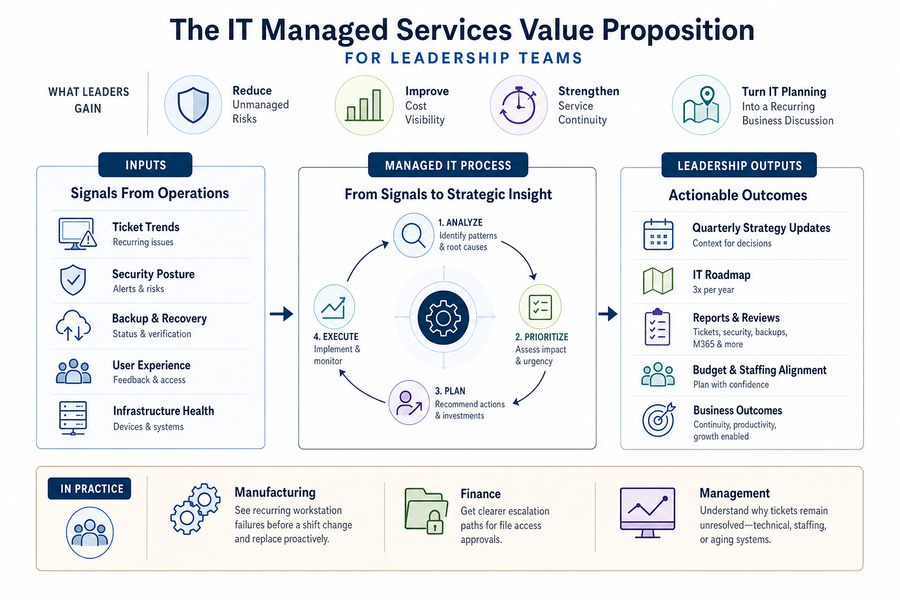
Leadership teams should expect managed IT to reduce unmanaged risk, improve cost visibility, strengthen service continuity, and turn IT planning into a recurring business discussion. That expectation is now mainstream, with 3 in 4 companies now expecting managed services to support business model transformation and innovation, not only fixed tasks.
That is why managed IT services belong in ticket trend reviews, backup verification summaries, roadmap meetings, and Microsoft 365 security reviews. We update IT roadmaps three times a year, then use quarterly strategy discussions to connect recurring support patterns to budget, staffing, risk, and growth decisions.
If the same department logs repeated device failures before month-end billing, the issue is a finance continuity problem. If a manufacturer sees shared workstation failures before shift change, the issue affects scheduling, order status, and production visibility.
Managed IT Services Improve Daily Workflows By Removing Recurring IT Friction
Daily workflow is where the value of managed IT services becomes visible. Slow devices, recurring access issues, suspicious emails, and unclear ticket status drain time from customer service, finance, production, and management.
Our human-first approach means users speak with a person, while our advanced ticketing process keeps requests visible from intake through resolution. We also learn each client's workflows, so support is not starting from zero every time an employee calls about an ERP login, a Teams file, or a finance workstation that fails during payment processing.
If an accounts payable clerk cannot open a vendor invoice stored in SharePoint, remote and unattended access lets us troubleshoot without making that employee wait at the desk. The delay is not limited to one user; it can hold up approval routing, vendor payment timing, and the controller's visibility into cash commitments. As the market is projected to grow from $348.12 billion in 2024 to $1.04 trillion by 2033, leaders are treating IT support as a workflow decision, not only a cost decision.
Why Managed IT Services Should Come Before Growth Exposes Gaps
Growth exposes weak IT processes quickly. New hires need devices, permissions, email, application access, and security controls on schedule. New locations need secure connectivity. Cloud costs rise when no one monitors usage. More approvals move through Microsoft 365, and informal support processes fail when the business adds people, systems, and customers.
That is why managed IT services become a scaling decision, especially when 8 in 10 expect long-term value from broader cross-functional deployment.
-
New users onboard faster: Access, devices, permissions, and security settings follow a defined workflow.
-
Cloud usage stays visible: Our Azure experience, cost management tools, staff training, and AI-enhanced cloud security help leaders manage spend while keeping controls aligned with growth.
-
Approvals stay moving: SharePoint, Teams, OneDrive, and file-sharing controls reduce permission confusion that slows invoice approvals, customer document reviews, and management signoffs.
Without that structure, a delayed laptop shipment becomes a delayed start date. A missed access request becomes a stalled customer onboarding task. An unmanaged cloud resource becomes an avoidable budget surprise.
More Articles You Might Enjoy:
Why Managed IT Services Improve Risk Control
Risk control means keeping systems patched, accounts protected, backups tested, and business data recoverable. Leaders ask why managed services providers matter because unmanaged IT risk appears as locked accounts, phishing emails, failed backups, outdated workstations, and unresolved alerts.
-
Account takeovers get flagged: Our anomaly-based account protection identifies unusual login patterns and data movement across Microsoft 365.
-
Email threats are filtered: Anti-phishing, malware scanning, URL reputation filtering, and monitoring protect email, OneDrive, SharePoint, and Teams.
-
Patches stop lingering: Automated updates and continuous monitoring reduce exposure from unsupported software, unpatched workstations, and overlooked servers.
-
Backups are verified daily: Real-time testing confirms backups are usable, with server restores in as little as 20 minutes when conditions allow.
Remote monitoring with after-hours alerts also helps detect server, workstation, and performance issues before the next workday, which matters when production, shipping, reporting, or customer commitments continue after the office closes.
Why Managed Services Providers Need Process Discipline
Provider quality depends on operating discipline, not just technical skill. With roughly 341,000 channel partners offering managed services by the end of 2025, executives need to separate polished sales language from repeatable process, accountable communication, and trustworthy staffing.
Leaders should audit process before signing or renewing an agreement. The right questions are practical: who sees the ticket, how is priority assigned, when does the business receive an update, and who has access to systems that contain customer, financial, or employee data?
-
Ticket workflow visibility: Confirm how requests are logged, prioritized, escalated, and reported.
-
Communication expectations: Require structured issue updates, resolution notes, and next steps.
-
Staff screening and trust: Ask about background checks, credit checks, DISC profiling, and technician access controls.
-
Roadmap cadence: Confirm strategy reviews, IT roadmap updates, documentation standards, and no monthly penalties.
At IT Force, our internal process matters because clients are trusting us with more than devices. They are trusting us with access to workflows, records, approvals, and customer commitments.
Managed Services Matter Across Manufacturing And Office Operations.
Specific workflows reveal IT maturity more clearly than abstract metrics because disruption shows uvp in production schedules, shared workstations, ERP access, shipping documents, customer service inboxes, Teams collaboration, and invoice approvals. Large enterprises still account for over 60% of total managed services usage, but manufacturers and growing office teams face the same operational pressure when systems fail or support tickets stall.
We bring more than 25 years of manufacturing IT experience, proactive monitoring, and a backup model that maintains three copies of data across two locations, with one copy offsite. A workstation near the floor is not a generic endpoint if it controls scheduling visibility, shipping documentation, or access to production data.
When a shared workstation fails near the production floor, clear ticket ownership keeps scheduling, shipping, and invoicing aligned. With proactive monitoring, defined escalation, and verified backups, the incident becomes a managed operational event instead of a cascading interruption.
Practical Steps Before Choosing A Managed IT Partner
Changing IT support models is difficult because leaders must manage budgets, employee expectations, vendor contracts, and operational risk at the same time. Since the managed services segment is projected to hold the highest share of the market in 2025, evaluate partners by operational fit, reporting discipline, and governance habits.
-
Map critical workflows: Identify systems tied to revenue, approvals, production, shipping, invoicing, and customer response.
-
Review ticket history: Look for recurring issues, unresolved patterns, slow handoffs, and requests that repeatedly affect the same teams or locations.
-
Audit Microsoft 365 exposure: Review phishing controls, sharing settings, Teams permissions, SharePoint governance, and account access patterns.
-
Validate backup recoverability: Confirm testing frequency, offsite copies, restore expectations, and daily verification evidence.
Set roadmap ownership before the first urgent issue arrives. We recommend defining who reviews IT priorities, budget tradeoffs, and roadmap updates three times a year, with quarterly strategy reviews that connect technical decisions to hiring plans, location changes, security exposure, and system replacement timing.
Talk Through The Next Step With IT Force
Managed IT helps leaders reduce support friction, improve risk control, protect daily workflows, and plan technology spending with more confidence. If you want a practical conversation about your environment, we can review where support, security, cloud, backup, and roadmap ownership need more structure.
The discussion can cover your current ticket process, Microsoft 365 protection, backup verification, employee onboarding, and IT roadmap cadence. Businesses can choose 12 months at 50 percent off or 6 months completely free. During the free trial, we do not take your money. There is also no monthly commitment, because we work with your company's size, needs, and budget. Contact us today.
Explore IT Services Near You